Microsoft 365 Copilot Cowork

Estimate Cowork usage.

Enter expected headcount and get an immediate budget signal. The full estimator below lets you refine prompt volume, credit assumptions, and pricing.

Everything is calculated in your browser. Your numbers never leave this page.

Who should use Cowork?

Only headcount is needed. The rest starts with Microsoft’s defaults.

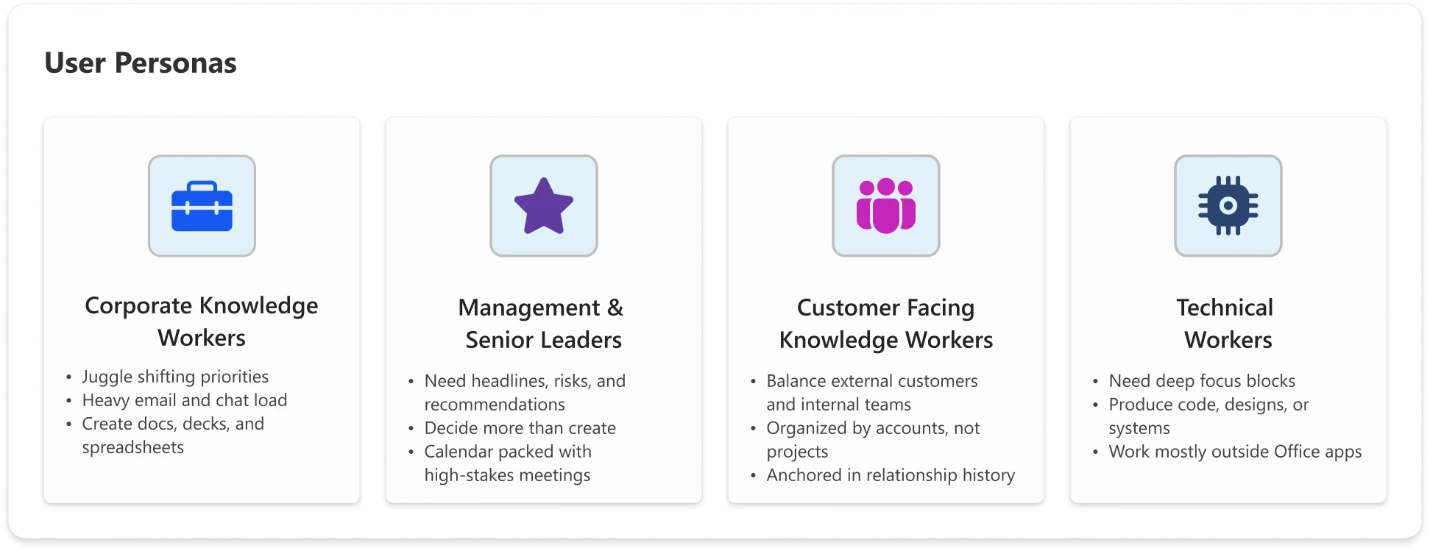
Corporate Knowledge Workers
Juggle shifting priorities; heavy email and chat load.
Customer-Facing Knowledge Workers
Balance external customers and internal teams.
Technical Workers
Need deep focus blocks; produce code, designs, or systems.
Managers & Senior Leaders
Need headlines, risks, and recommendations.
Users
0
Monthly budget
$0
Avg. / user
-

Based on Microsoft’s CustomerCoworkEstimator model.

0 credits / month

What drives cost

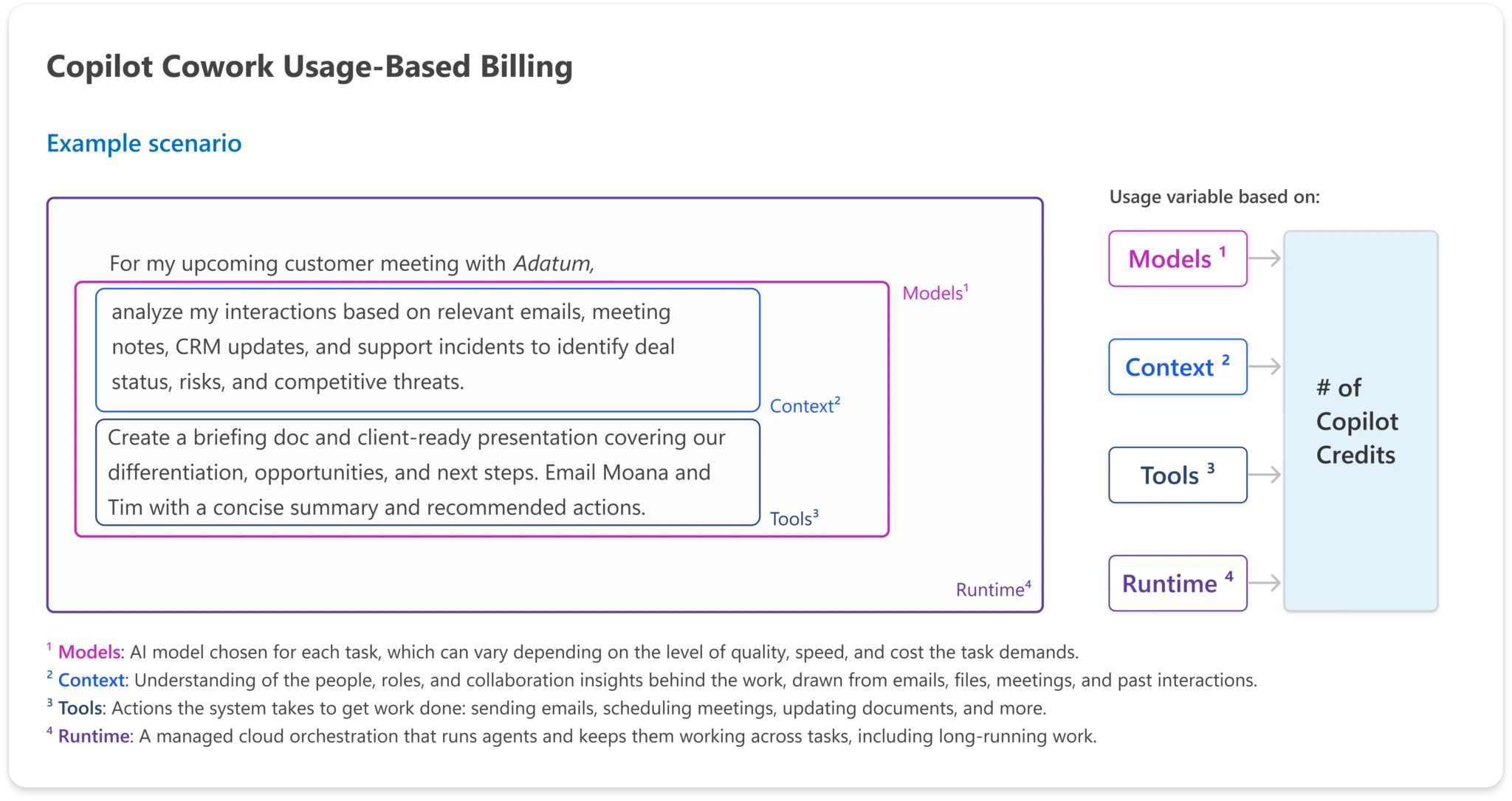
Four inputs feed into one number of credits

Every task's credit cost is built from four ingredients.

Microsoft Copilot Cowork usage-based billing diagram showing models, context, tools, and runtime feeding into Copilot Credits.
Image source: Microsoft
Planning logic

How the Microsoft mechanics become an estimate.

Open credit assumptions
01
Cost drivers
models, context, tools, runtime
02
Prompt type
light, medium, or heavy
03
Credits / prompt
125, 500, or 2,500 starting point
04
Budget
price per credit stays editable

Task sizes

Light, medium, and heavy

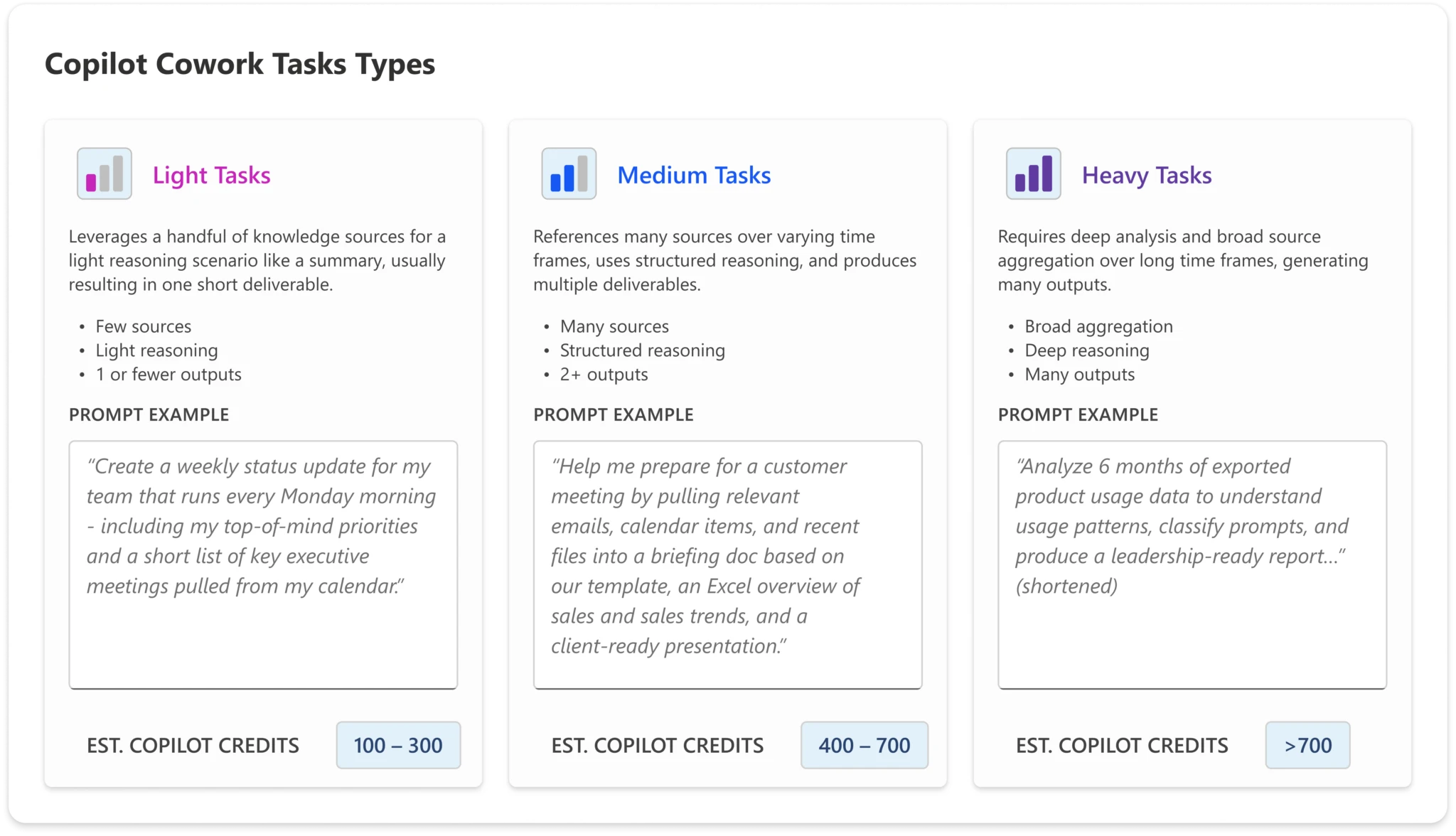
From Frontier usage, Microsoft observed three task patterns. They are the backbone of the estimator.

Microsoft Copilot Cowork task types graphic for light, medium, and heavy tasks.
Image source: Microsoft
Calibration

The visual taxonomy becomes three editable defaults.

Light
100-300
Default 125
Medium
400-700
Default 500
Heavy
>700
Default 2,500
Sensitivity
1 heavy = 20 light

Who uses it

Four user personas

Microsoft identified four personas with distinct usage patterns. They map one to one onto the estimator's Step 1 segments.

Microsoft Copilot Cowork user personas graphic.
Image source: Microsoft
Forecast logic

Personas become rollout and budget segments.

Use personas as rollout and forecast segments before collapsing everything into a tenant average.

Corporate
volume baseline
Managers
ROI story
Customer-facing
context-heavy
Technical
heavy-task risk

Step-by-step estimator

Estimate your tenant's Cowork spend

Only headcount is required. Steps 2 and 3 are pre-filled with Microsoft's Frontier defaults, so you can see a number right away and refine from there.

Who will use Cowork?

Number of users

Corporate Knowledge Workers
Juggle shifting priorities; heavy email and chat load.
Customer-Facing Knowledge Workers
Balance external customers and internal teams.
Technical Workers
Need deep focus blocks; produce code, designs, or systems.
Managers & Senior Leaders
Need headlines, risks, and recommendations.
Total users0
Monthly budget$0

Disclaimer: This spreadsheet [tool] is designed to help inform budgeting considerations for potential Cowork purchases. The data represents generalized estimates and may vary based on individual customer scenarios. Microsoft does not guarantee the accuracy of this information and disclaims any warranties or assurances related to expected results or outcomes.

This estimator reproduces Microsoft's published budgeting model for illustration. It is not a quote. Experts Inside can help you validate it against your own tenant telemetry.

The budgeting formula

Users × prompt mix × price per prompt

When you combine users by persona with their mix of light, medium, and heavy tasks, and apply a price per prompt, you get a flexible cost model that can help you create a cost estimate you can refine over time. At its core, the model multiplies the number of users in each segment by their expected prompt volume across light, medium, and heavy tasks, applies the cost per prompt type, and sums the total.

01
For each persona:
credits/user = (light × 125) + (medium × 500) + (heavy × 2,500)
02
Then across all four personas:
total_credits = Σ (users × credits/user) · budget = total_credits × $0.01

Worked example: 250 users, all defaults

PersonaUsersCredits / userMonthly creditsMonthly cost
Corporate Knowledge Workers12020,7502,490,000$24,900.00
Customer-Facing Knowledge Workers6021,1251,267,500$12,675.00
Technical Workers4041,0001,640,000$16,400.00
Managers & Senior Leaders3012,125363,750$3,637.50
Total2505,761,250$57,612.50

Results: 5,761,250 credits/month, $57,613/month (list), $230.45 average per user per month, roughly $691,350/year.

Controlling cost

Control, visibility, efficiency

Usage-based billing is real, and so are the guardrails. Cowork ships cost management across three themes.

Usage-based billing makes it critical to track the value and ROI you get from AI. Long-running, agentic work can create a lot of value for your business but also requires significant compute resources.

Control

Customers decide when Cowork turns on, who gets access, and how much can be spent.

  • Cowork is off by default. Admins decide when to enable Cowork in their tenant and who gets access.
  • Spending limits at the tenant, group, and user levels. Admins create scoped billing policies and define budgets, including user-level caps set inside group policies.
  • Customizable usage alerts. Admins set the thresholds that matter for their organization and groups, and choose who gets notified when spend crosses them.
  • User-initiated credit requests. When a user needs additional credits to complete a task, they can request them from inside Cowork.

Visibility

Customers see what's being used, and what each task costs.

  • Usage reporting at the tenant, group, and user levels. Admins see usage broken down by user, group, and feature, with clear accountability across the organization.
  • User-level pricing for each task, in credits (coming soon after GA). Users see what each task costs as they run it.

Efficiency

Customers have options to manage cost.

  • Two payment options: PayGo and P3. Customers choose pay-as-you-go for flexibility, or P3 to commit to a usage volume in advance in exchange for a discount. PayGo is priced at $0.01 per Copilot Credit.
  • Model choice in Frontier. Where multiple models are available, customers can use the model picker to manage cost-per-task.

Cost will fall over time

Three factors will continue to reduce cost over time: models will get cheaper, Cowork will get better at matching models to tasks, and both context retrieval and tool use will become more efficient.

Models and availability

At general availability, Copilot Cowork runs on Anthropic models, including Opus 4.8 and Sonnet 4.6. In Frontier, customers can use GPT 5.5, with Cowork 1 coming soon.

Cowork 1 will deliver optimal cost, quality, and enterprise-grade use, including removing model bias. It's designed to handle everyday Copilot tasks at a substantially lower cost, making it a strong option for cost-sensitive workloads.

Billing timeline

Billing for Copilot Cowork begins today. Before usage ramps, admins can set spending limits and allocate budgets using the cost management controls described above. Tenants that had at least one user in the Frontier program (March 30 to June 16) who used Cowork during that period get a grace period on Cowork usage and will not be billed until July 1, 2026, to support the transition.

  • June 16, 2026: billing begins.
  • Mar 30 – Jun 16, 2026: Frontier program window.
  • July 1, 2026: qualifying Frontier tenants billed.

How Experts Inside helps

We make Cowork predictable, governed, and worth it.

  • Enablement: turn Cowork on for the right users, in the right order.
  • Governance: spend limits, alerts, and reporting that match your finance posture.
  • ROI tracking: tie credits spent to outcomes delivered, per team and per workflow.
  • Persona-based rollout: scope usage to the personas where Cowork pays back fastest.

Disclaimers

Microsoft, footnote 1: The information presented herein is derived from aggregated and anonymized data collected from customers who participated in the Cowork Frontier program. This data is intended for illustrative and informational purposes only and may not reflect the experience or results of all customers. It should not be relied upon as definitive, complete, or predictive of future outcomes.

Microsoft, footnote 2: This spreadsheet is designed to help inform budgeting considerations for potential Cowork purchases. The data represents generalized estimates and may vary based on individual customer scenarios. Microsoft does not guarantee the accuracy of this information and disclaims any warranties or assurances related to expected results or outcomes.

Microsoft, Excel welcome panel: Use this spreadsheet to explore how your organization might use Copilot Credits when using Cowork. By following the step-by-step process and entering your expected usage, you can model different scenarios and get a directional view of potential costs. This model is provided for illustrative purposes only to demonstrate an approach, and organizations should build and validate their own models based on their specific needs. Start at the top, follow each step in order, and adjust assumptions as needed to reflect your organization's needs. These estimates assume Anthropic Opus 4.8.

Experts Inside: This estimator reproduces Microsoft's published budgeting model for illustration. It is not a quote. We can validate it against your own tenant telemetry.